
- PlayYou're in the match
- RecordOne tap, in-game
- ReactFaceCam over gameplay
- EditTrim & adjust
- Format16:9 → 9:16
- PublishYouTube · Shorts · TikTok · Reels
Gameplay + FaceCam
Your gameplay.
Your reaction.
Your content.
Record Android gameplay with FaceCam, edit your reaction, and create videos ready for YouTube, Shorts, TikTok and Reels.
No watermark · No account · Up to 1080p · Up to 120 FPS*
*Depending on your device capabilities.
Record the moment
When the moment happens,
capture it.
The big difference
Your FaceCam.
Your way.
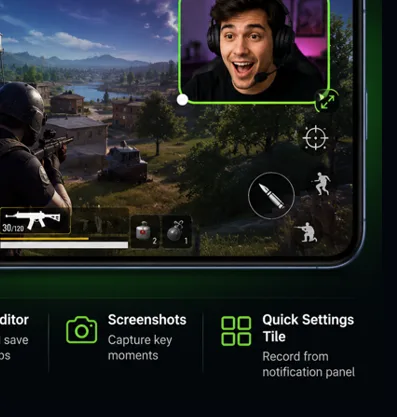
Record your camera as a separate video track and decide how it looks later.

Drag the FaceCam. Pull the corner to resize.
Same gameplay. New composition.
Edit your reaction
Your reaction doesn't have to stay in one place.
Trim your recordings and adjust your FaceCam directly from the gallery. Move it, resize it, reshape it — or animate it with keyframes.
- Trim the start and end of any recording
- Adjust position, size and shape of the FaceCam
- Animate the FaceCam with keyframes
Timeline · keyframes · trim — drag the playhead
Keyframes
Make your FaceCam move
with the moment.
Animate your FaceCam throughout the video.
Vertical content
One gameplay.
Every format.
Create vertical videos for TikTok, YouTube Shorts and Reels — or stay with classic 16:9 gameplay.
Audio
Capture the sound that matters.
Choose exactly what you want to record — the game, your voice, both, or nothing at all.
Internal audio recording is available on supported Android 10+ devices.
Game audio + microphone
Floating controls
Stay in the game.
Control recording without leaving your gameplay.
Tap ● to start · 📸 for a screenshot · — to hide
No watermark
Your video.
Not our logo.
Record clean gameplay without watermarks.
Your recordings stay yours
No account.
No cloud. Just your device.
- No account creation required
- No cloud upload required
- Videos are saved directly to your device
Built for creators
Turn one match into content
for every platform.
YouTube Gameplay
16:9 · Gameplay + FaceCam
YouTube Shorts
9:16 · Fast vertical content
TikTok
9:16 · Gameplay + reaction
Reels
9:16 · Short-form gaming
Reaction Videos
FaceCam protagonista
Gaming Highlights
The best moment, clipped
Performance
Record your way.
- Up to 1080p
- 30 / 60 / 120 FPS*
- 16:9 & 9:16
- FaceCam
- Game audio
- Microphone
- Screenshots
- No watermark
- Android 8+
- 32 languages
*120 FPS depends on device, display and encoder capabilities.
The workflow
More than a screen recorder.
Basic screen recorder
- 1 Record
- 2 Stop
- 3 Export
GameCam
- 1 Gameplay
- 2 FaceCam
- 3 Separate track
- 4 Editing
- 5 Keyframes
- 6 Vertical formats
- 7 Creator workflow
FAQ
Questions, answered.
What is GameCam?
GameCam is an Android app that records your gameplay while showing your face over it with FaceCam. It is built for gaming creators who want to turn matches into videos for YouTube, Shorts, TikTok and Reels.
How do I record gameplay with FaceCam on Android?
Open GameCam, place the FaceCam anywhere over the gameplay, resize it if you want, and press Record. The floating controls let you start and stop without leaving the game.
Can I record my face while gaming?
Yes. FaceCam shows your camera directly over the gameplay while you record. You can place it anywhere and resize it on the fly.
Can I move the FaceCam after recording?
Yes. In the FaceCam editor you can adjust the camera's position, size and shape, and use keyframes to animate it throughout the video.
What is GameCam's Separate FaceCam mode?
In SEPARATE mode your camera is saved as an independent video track inside the same MP4 file. You can move, resize or remove it later without altering the gameplay.
Can I record gameplay vertically for TikTok and Shorts?
Yes. GameCam creates 9:16 vertical videos for TikTok, YouTube Shorts and Reels, with a side-by-side layout that shows gameplay and your face. You can also record classic 16:9.
Can I record game audio and microphone at the same time?
Yes. You can capture game audio, microphone, both together, or record without audio. Internal audio recording is available on supported devices running Android 10 or higher.
Does GameCam add a watermark?
No. GameCam records clean gameplay without watermarks.
Do I need an account to use GameCam?
No. GameCam does not require account creation or cloud uploads. Your videos are saved directly to your device.
Does GameCam upload my videos to the cloud?
No cloud upload is required. Recordings are saved directly to your device and stay yours.
Does GameCam support 120 FPS?
GameCam supports 30, 60 or 120 FPS depending on your device capabilities. 120 fps requires hardware compatibility with your specific device, display and video encoder.
What Android versions does GameCam support?
GameCam requires Android 8.0 or higher and is available in 32 languages.